🚚 Free UK delivery on every order · 30-day returns · UK customer support · Secure checkout

Wireless CarPlay Adapters: Will One Work in My Car? (UK Guide)

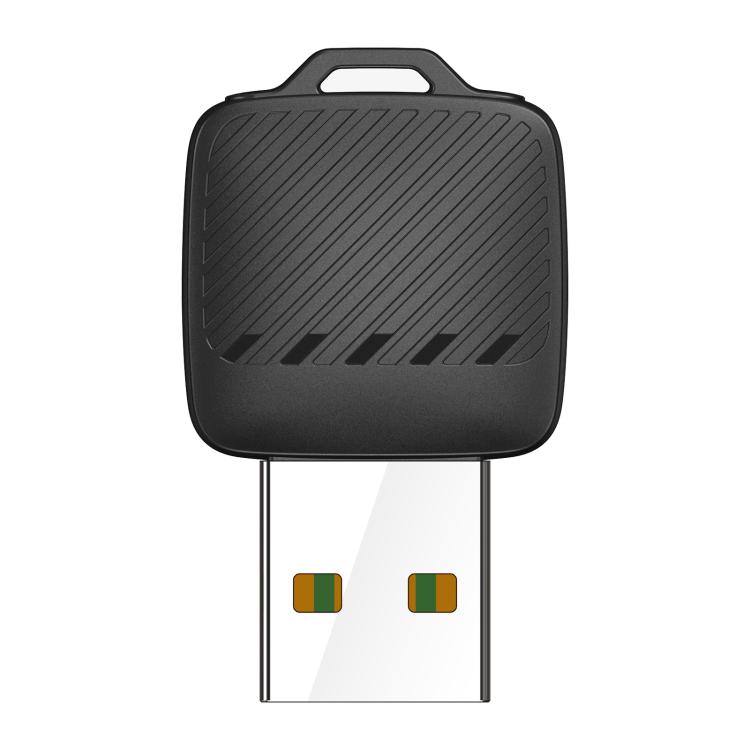
Quick answer: A wireless CarPlay adapter is a small USB dongle that turns your car’s wired Apple CarPlay or Android Auto into a wireless connection. You plug it into the car’s CarPlay USB port once, pair your phone, and from then on the phone connects automatically when you start the car. It only works in cars that already have wired CarPlay or Android Auto built in.
At a glance
- Works with: cars and head units with factory wired CarPlay or Android Auto.
- Does not: add CarPlay to a car that does not already have it.
- Setup: plug in, pair once, no tools or apps needed.
- On IZORRA: the Mini Wireless CarPlay and Android Auto Adapter, with free tracked UK delivery.
Will a wireless CarPlay adapter work in my car?
Check these three things before you buy:
- Your car already has CarPlay or Android Auto with a cable. If you plug your phone in with a USB cable today and the CarPlay or Android Auto screen appears, an adapter can make it wireless.
- You know which USB port is the CarPlay port. Many cars have several USB sockets but only one carries CarPlay. It is often marked with a phone or smartphone symbol. Your car handbook will say which one.
- Your phone supports wireless use. Wireless CarPlay works with recent iPhones. Wireless Android Auto generally needs Android 11 or later.
If your car has no CarPlay or Android Auto at all, an adapter cannot add it. In that case a good car phone holder and a Bluetooth handsfree kit are the simple alternatives.
How to set up a wireless CarPlay adapter
- Start the car and make sure wired CarPlay or Android Auto works with your cable.
- Unplug the cable and plug the adapter into the same USB port.
- Wait for the adapter’s light, then open Bluetooth on your phone and pair with the adapter.
- Accept the CarPlay or Android Auto prompt on your phone and the car screen.
- Next time you get in, the phone reconnects automatically within a short time of starting the car.
Pros and cons
Pros
- No more plugging in a cable for every short trip.
- The phone can stay in your pocket, bag or a wireless charging car mount.
- Saves wear on your phone’s charging port and cables.
- Much cheaper than a new head unit.
Cons
- Wireless use drains your phone battery faster than a cable, which also charges the phone. A wireless charging mount solves this.
- There can be a short connection delay when you start the car.
- Some cars cut power to the USB port when the engine stops, so the adapter restarts each trip. This is normal.
Tips for a smooth connection
- Remove old CarPlay or Android Auto pairings from the car if you have several phones saved.
- Keep your phone’s software up to date.
- If music stutters, move the phone out of a metal glovebox or coin tray.
- If the car has a short USB cable socket in the armrest, a short USB extension can help the adapter sit flat.
Make it a complete car setup
- AIMITE M8 vacuum magnetic car mount: holds the phone and charges it wirelessly while CarPlay runs over the air.
- Browse more car phone holders and handsfree and car audio.
- Read our car phone holder guide.
Frequently asked questions
Can a wireless adapter add CarPlay to any car?
No. It only converts existing wired CarPlay or Android Auto to wireless. The car or head unit must already support CarPlay or Android Auto with a cable.
Does the adapter work with both iPhone and Android?
The IZORRA adapter supports wired-to-wireless Apple CarPlay and Android Auto. Wireless Android Auto generally needs Android 11 or later.
Does a wireless CarPlay adapter drain the car battery?
It draws a small amount of power from the USB port while the car is on. Most cars cut USB power when switched off, so it does not drain the battery when parked.
Is there a delay with wireless CarPlay?
Music and navigation work normally. There can be a short delay when connecting after you start the car, and a slight delay on touch controls compared with a cable.
Do I need an app?
No. You pair the adapter with your phone over Bluetooth and accept the CarPlay or Android Auto prompts.
Will my phone still charge?
Not through the adapter. Use a wireless charging car mount or a separate charger to keep your phone topped up.